Features Installation Credits GitHub
v1.0.0 — The Genesis Release

🐋 OrcaFile

A fast, lightweight desktop app that scans any folder or drive and
instantly groups every file by its extension.

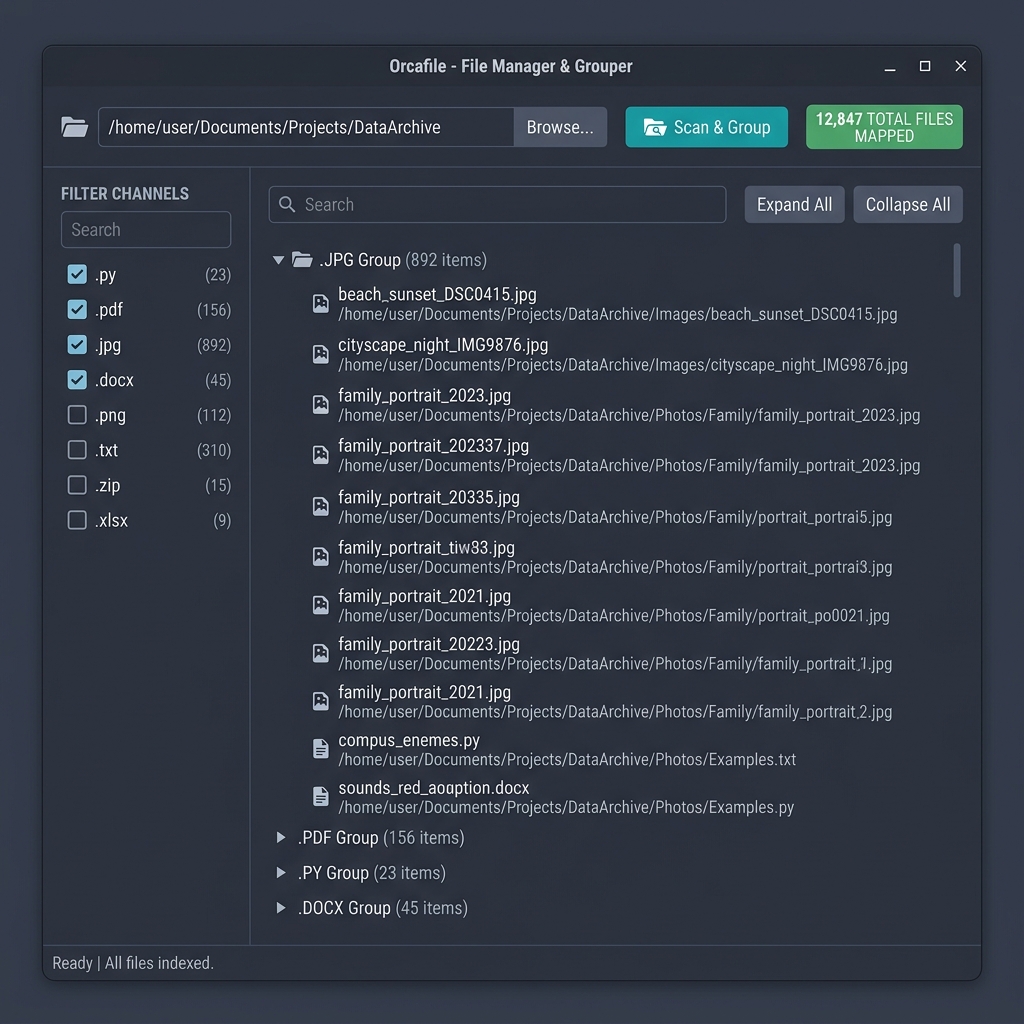
Built with a premium Nord-inspired interface and a blazing-fast multi-threaded indexing engine. Navigate massive directories effortlessly.
Platform Windows
License GPLv3
Built with Python + PyQt6
OrcaFile application screenshot showing the Nord-themed file organizer interface

Powerful Features,
Beautiful Design

Every detail has been meticulously crafted for the best file organization experience.

Blazing Fast Indexing

A custom two-pass background indexing engine scans massive local and external drives without freezing the UI, with accurate progress tracking.

Premium Nord Theme

A carefully crafted, high-contrast workspace featuring rounded corners, subtle hover effects, and streamlined controls for extended usage.

Accumulative Search

Intelligent search session memory. Search for an extension, select it, clear the search, and continue filtering without losing selections.

Deep File Tree Filtering

Quickly locate specific files within the indexed tree structure. Non-matching groups are hidden, reducing visual clutter instantly.

Native Explorer Integration

Double-click any file or folder to instantly reveal its location in Windows File Explorer. Seamless OS integration built in.

Multi-Threaded Engine

Background indexing never blocks the UI. The responsive, multi-threaded architecture ensures smooth performance even on large drives.

Install in Seconds

Download the installer and let the setup wizard handle everything.

1

Download the Installer

Get OrcaFile_Setup.exe from the button below or from the GitHub releases page.

2

Run the Setup Wizard

The wizard automatically installs all required dependencies and places OrcaFile in Program Files.

3

Launch & Organize

Open OrcaFile from your Desktop or Start Menu and start organizing your files instantly.

Download OrcaFile v1.0.0

Windows only • Free & Open Source (GPLv3)

The setup wizard will:

  • Install all required dependencies
  • Add OrcaFile to Program Files
  • Optionally create Desktop shortcuts
  • Optionally create Start Menu entries

Credits & Acknowledgments

OrcaFile stands on the shoulders of incredible open-source technologies.

🐍

Python

Core application logic, indexing engine, and backend services.

python.org →
🎨

PyQt6

Comprehensive Python bindings for the Qt 6 framework powering the UI.

riverbankcomputing.com →
⚙️

Qt Framework

The powerful cross-platform application development framework.

qt.io →